Startup WebLogic
Depending on your configuration, servers can take time to startup. WebLogic deploys its application after two phases.
# Phase 1: The application has the “prepare” status. At this step WebLogic controls package integrity and ensure the application can be deployed. We can meet errors at this step if a package has been corrupted while transferring from the Admin server to managed servers. This phase includes several steps. ## STATE_NEW : application has never been uploaded before. ## STATE_PREPARED : application package is available on managed servers. ## STATE_ADMIN # Phase 2: The application has the “active” status. WebLogic deploys the application in all managed servers of the cluster.
Real life: On a WebLogic 12c platform we corrupted our WAR application in different ways. You can find below results of theses tests
| Test description | Deployment status | Application available |
|---|---|---|
| Delete plan.xml | Active | Yes |
| Delete web.xml | Active | Yes |
| Delete weblogic.xml | Active | Yes |
| Corrupt war file with dd command | Active | No |
| Web application accessing a datasource which doesn’t exists | Failed | No |
Startup and Shutdown Classes
Startup classes and shutdown classes are loaded when the server bootup. Depending on the deployment order the class can be loaded before or after other deployments and services.
StartLogger example
Description
In this example we developed a class named DatabaseLogger which writes the current date into t_start and a class named StartServlet which calss DatabaseLogger. When configuring a startup class in WebLogic console, the managed server will try to call the method main into this class. If we do not write this method main the following error will occur during startup:
java.lang.NoSuchMethodException: app.StartServlet does not define 'public static void main(String[])'
Configuration
To configure a class into startup we first need to add the package to classloader. A quick and dirty solution is to add lines below to setDomainEnv.sh
CLASSPATH="${CLASSPATH}:/opt/wls12210/user_projects/domains/DOMAIN-2/upload/StartLoggerProject.jar"
export $CLASSPATH
Then you can add the class to start to Weblogic configuration with the following steps:
- Click Environment and Startup and Shutdown Classes
- Click New and select Startup Class
- Add Startup name to display in WebLogic console and startup class name to boot
- Select target and press finish
For our example we set the following configuration
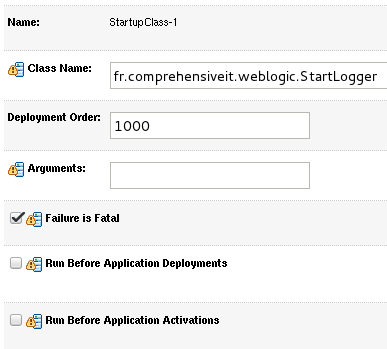
If startup class failed to load server will shutdown. This is not the default value but can be usefull to know at the begining your application is not able to initialize
Source code
StartLogger class contains a single main method which calls writeStartTime method from DataSourceClient
package fr.comprehensiveit.weblogic;

public class StartLogger {
      public static void main(String args[]) throws InterruptedException {
              System.out.println("StartLogger");
              DatabaseLogger dsc = new DatabaseLogger();
              int myResult = dsc.writeStartTime();
              System.out.println("StartLogger result:"+myResult+"\n");
      }
}
DataSourceClient writes current date and time in t_start2 column. We let WebLogic manages database connection by using testDS datasource.
package fr.comprehensiveit.weblogic;

import java.sql.PreparedStatement;
import java.sql.ResultSet;
import java.sql.SQLException;
import java.util.Hashtable;

import javax.naming.Context;
import javax.naming.InitialContext;

import oracle.jdbc.OracleConnection;

public class DatabaseLogger {
      public int writeStartTime() {
              OracleConnection conn=null;
          javax.sql.DataSource ds=null;
          Hashtable env = new Hashtable();
          //Define weblogic context factory and URL
          env.put( Context.INITIAL_CONTEXT_FACTORY, "weblogic.jndi.WLInitialContextFactory" );
          env.put(Context.PROVIDER_URL, "t3://192.168.0.250:23001");
          PreparedStatement psmt;
          try {
              Context context=new InitialContext( env );
              //Try to get datasource testDS from WebLogic
              ds=(javax.sql.DataSource) context.lookup ("testDS");
              //Get a connection from pool
              conn=(OracleConnection) ds.getConnection();
              String sql = "insert into t_start2 (d_start) values(Current_TimeStamp)";
              psmt = conn.prepareStatement(sql);
              //Execute query
              psmt.executeQuery();
              conn.commit();
              conn.close();
          }catch(Exception ex){
              try {
                      conn.rollback();
              }catch(Exception ex2) {
                      System.out.println("Can not rollback prepared statement. This might occur if connection failed before initialization.");
              }
              //handle the exception
              ex.printStackTrace();
              return 1;
              }
              return 0;
      }
}
Startup
Before starting WebLogic we can check that no entry exists into t_start2
SQL> select * from webusr.t_start2;
no rows selected
During WebLogic bootup we can notice that WebLogic invoked the main method
We can also verify if the entry exists
SQL> select * from webusr.t_start2;

        ID D_START
---------- ------------------------------
        28 27-AUG-16 03.43.38.656536 PM
CacheRetriever example
In this example we are showing how startup class can be used. We developed a servlet which requires quite lot of informations from database and store it to cache before displaying result to user. This servlet will take time at the first run as cache is not initialized. Then we developed a jar that we initialize cache at the bootup. Hence when servlet is called the cache is initialized already.